Thesis defense: validating XAI, gamification, and local-first architecture

Today marked the culmination of two years of research, development, and iteration. I successfully defended my Master's thesis, NestShield: An AI-Powered Cybersecurity Assistant for Non-Technical Users, before my committee at Full Sail University. The defense validated three core hypotheses through a pre/post intervention study.

+54.2 ptsRansomware understanding33.3% to 87.5% accuracy
75%Voluntary remediationGamification drove action
6.4/7Trust scoreLocal-first architecture validated

The defense

The 60-minute defense included a 10-minute live demonstration of NestShield's core features: AEGIS AI explanations, gamification mechanics, and the Threat Radar visualization. The committee asked hard questions about research validity, architecture decisions, and commercialization feasibility. Each one reinforced the value of acknowledging limitations while standing behind the validated findings.

Key findings

  • H1, knowledge: XAI-driven education significantly improved security comprehension, with the largest gains on complex concepts like ransomware (33.3% to 87.5%).
  • H2, behavior: Gamification achieved a 75% voluntary remediation rate, though two participants felt motivated but lacked the means to act, revealing a motivation-behavior gap.
  • H3, trust: Local-first architecture earned a 6.4/7 trust score, with 93% preferring local processing over cloud alternatives. Trust rose 33% after people used the system.

Technical achievements

  • AEGIS with RAG: Mistral 7B with retrieval-augmented generation over ChromaDB for contextual, personalized security explanations.
  • FastAPI backend: an async architecture with WebSocket connections for real-time scan updates and streamed AI responses.
  • React + TypeScript front end: a type-safe UI with gamification (XP, ranks, Digital Health Score) and interactive threat visualizations.
  • 100% local processing: no cloud dependencies. Inference, scanning, and storage all happen on-device, eliminating the privacy tax.

Successes

All three hypotheses validated. The combination of XAI, gamification, and local-first architecture proved effective for security education. The jump in ransomware understanding shows conversational AI can work as a real-time security tutor.

Research honesty paid off. Being transparent about participant attrition, including the participants who struggled with installation, showed intellectual integrity, and the committee respected it.

Challenges

PyInstaller packaging: ChromaDB's dynamic dependencies corrupted the RAG store in the standalone executable. Production needs installer-based deployment or a different packaging approach.

Motivation-behavior gap: high motivation doesn't automatically become action. Users need enablement, through assisted remediation, alongside motivation.

Next steps

Phase 1, the proof of concept, is complete. The next phase covers web-based deployment, assisted remediation, and validation with a larger group of users.
Read the full thesis (PDF) View the defense slides (PDF)

Engineering intelligence: performance profiling and adaptive AI

This week NestShield evolved from a static dashboard into a reactive system. The goal was an "Autonomous Consultant" persona: an AI that doesn't just answer questions but analyzes system telemetry to propose remediation steps on its own.

The challenge: CPU bottlenecks

While integrating the always-on agent, I hit a critical performance regression. The global state listener meant to sync dashboard risks with header notifications triggered a race condition in React's render cycle. The result was an infinite loop that pinned the browser's main thread at 100% CPU.

The solution: ref-based latching

I re-engineered Chatbot.tsx around a reference latch. Using useRef to track message state outside the render cycle, with strict dependency management in useEffect, eliminated the redundant reconciliations.

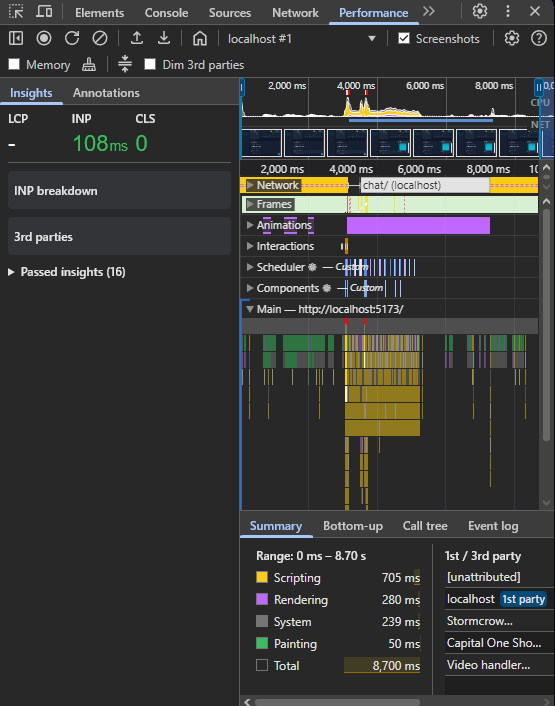
100%CPU loadBefore the fix
705 msScripting timeAfter the fix
16 msINP latencyAfter the fix
Chrome DevTools performance profile showing an idle CPU after the fix
Chrome DevTools confirming an idle CPU after the optimization.

Successes

The adaptive persona logic works. The system detects the user's gamification level and switches between simple analogies for Rookies and technical language for Experts.

Challenges

Syncing the header's notification bell with the dashboard's scan results meant lifting state into a global ScanContext. It took time, but it was necessary for a cohesive experience.

Next steps

Now that the AI can propose fixes, the next step is automated remediation: Python scripts that let the agent apply fixes, like closing ports, after the user approves.

From concept to execution: profiling the knowledge engine

This week marked the shift from architectural planning to backend implementation. The focus was knowledge ingestion: teaching AEGIS, the assistant's AI, to understand cybersecurity standards like NIST 800-53 and the OWASP Top 10.

The build

I built a Python ingestion pipeline (ingest_knowledge.py) using LangChain concepts and ChromaDB for vector storage. It runs four steps:

  • Parsing: extracts text from dense, unstructured PDFs with pypdf.
  • Chunking: splits text into 1,000-character overlapping segments to preserve context.
  • Embedding: converts text into vectors with a local transformer model.
  • Storage: indexes the vectors in a persistent database for retrieval-augmented generation.

Performance profiling

Using psutil and OS-level monitoring, I stress-tested ingestion of more than 600 pages of technical documentation.

2,068Chunks ingestedFrom 600+ pages
39.1 sExecution timeFull ingestion run
733 MBRAM spikeMemory-bound workload

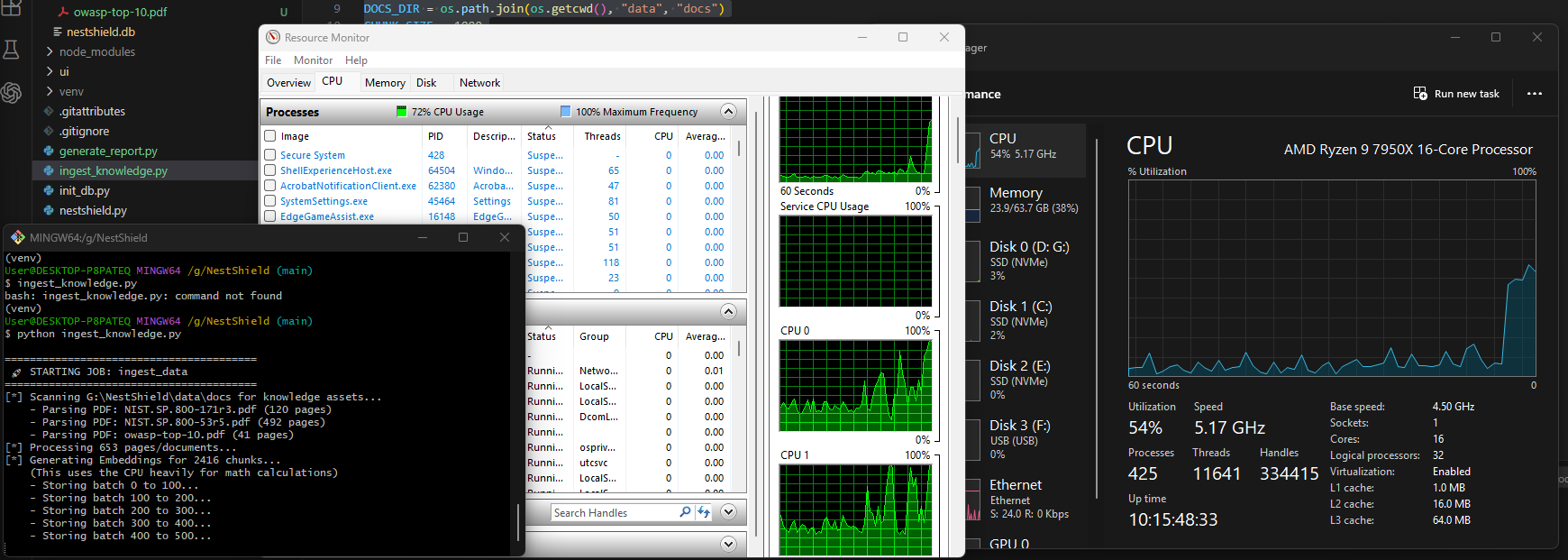
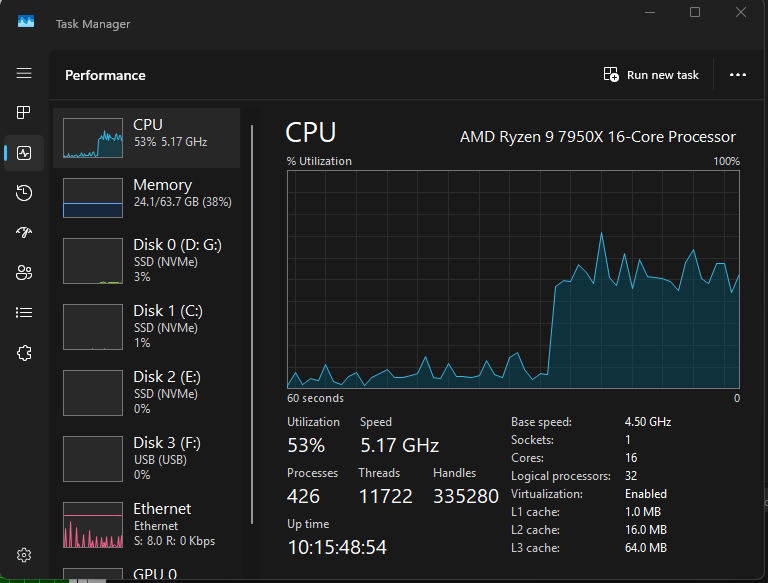
Profiling showed the operation is memory-bound. The roughly 733 MB increase confirms that loading the transformer model and running the embedding math is the main resource cost. CPU usage spiked in short bursts, which is typical for vectorization.

Operating system CPU graph showing short spikes during ingestion
OS-level CPU activity during ingestion.
Console output of the ingestion script's performance report
The script's performance report.

Successes

The error handling proved robust. A corrupt ISO 27001 PDF failed to parse, but the script caught the exception, logged it, and kept processing the NIST and OWASP documents. That fail-safe design matters in production.

Challenges

Accurate CPU profiling inside Python was hard. psutil often reported 0.0% because its sampling interval missed the rapid bursts of vector math, so OS-level monitoring was needed for the full picture.

Next steps

With the knowledge base working, the next phase connects the React front end to it, so users can ask natural-language questions about the documents.

Laying the foundation: research and architecture

Building robust software starts long before the first line of code. In the research, planning, and design phase of my capstone, I focused on turning NestShield from a concept into an architectural plan.

Features and architecture

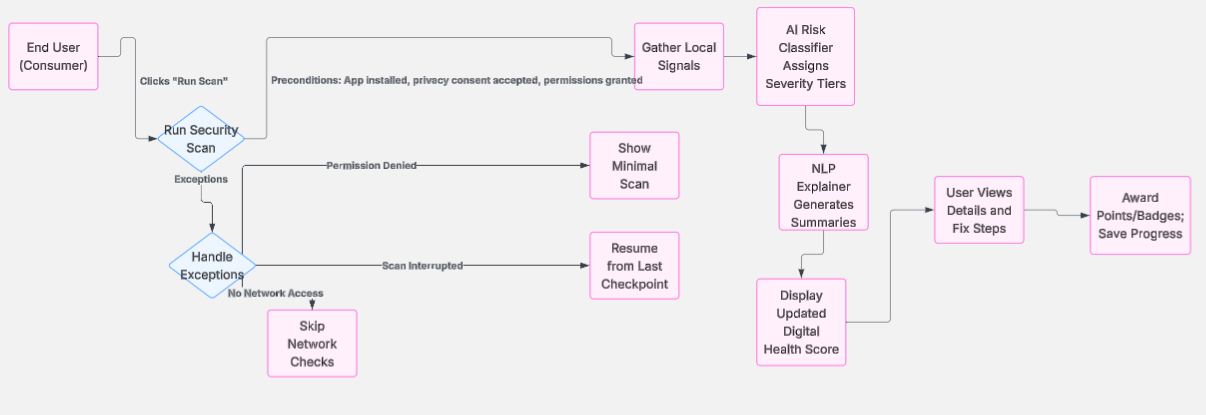
My main goal was designing the collaborative intelligence framework. I used Python for backend logic planning and created high-level diagrams of the user flow. The biggest challenge was handling data privacy in a collaborative environment.

Initial NestShield architecture diagram
The initial architecture flow.

What went right

I defined the core problem statement. Attending the "EstiMate" defense presentation taught me how much scoping matters, so I narrowed my focus to the collaborative intelligence aspect.

What went wrong

Time management. Balancing technical research on Python libraries with the academic proposal led to some late nights.